
If you have scheduled a campaign to run in the future but need to stop it before it starts, you can easily cancel it.
Important: You can only cancel campaigns that have a "Scheduled" status. Once a campaign has started processing (i.e., its status is "Processing" or "Sent"), it cannot be stopped.
How to Cancel a Scheduled Campaign
- Navigate to Campaigns: Go to the
Campaignspage in the sidebar. - Go to the "Scheduled" Tab: This tab lists all campaigns that are set to run in the future.
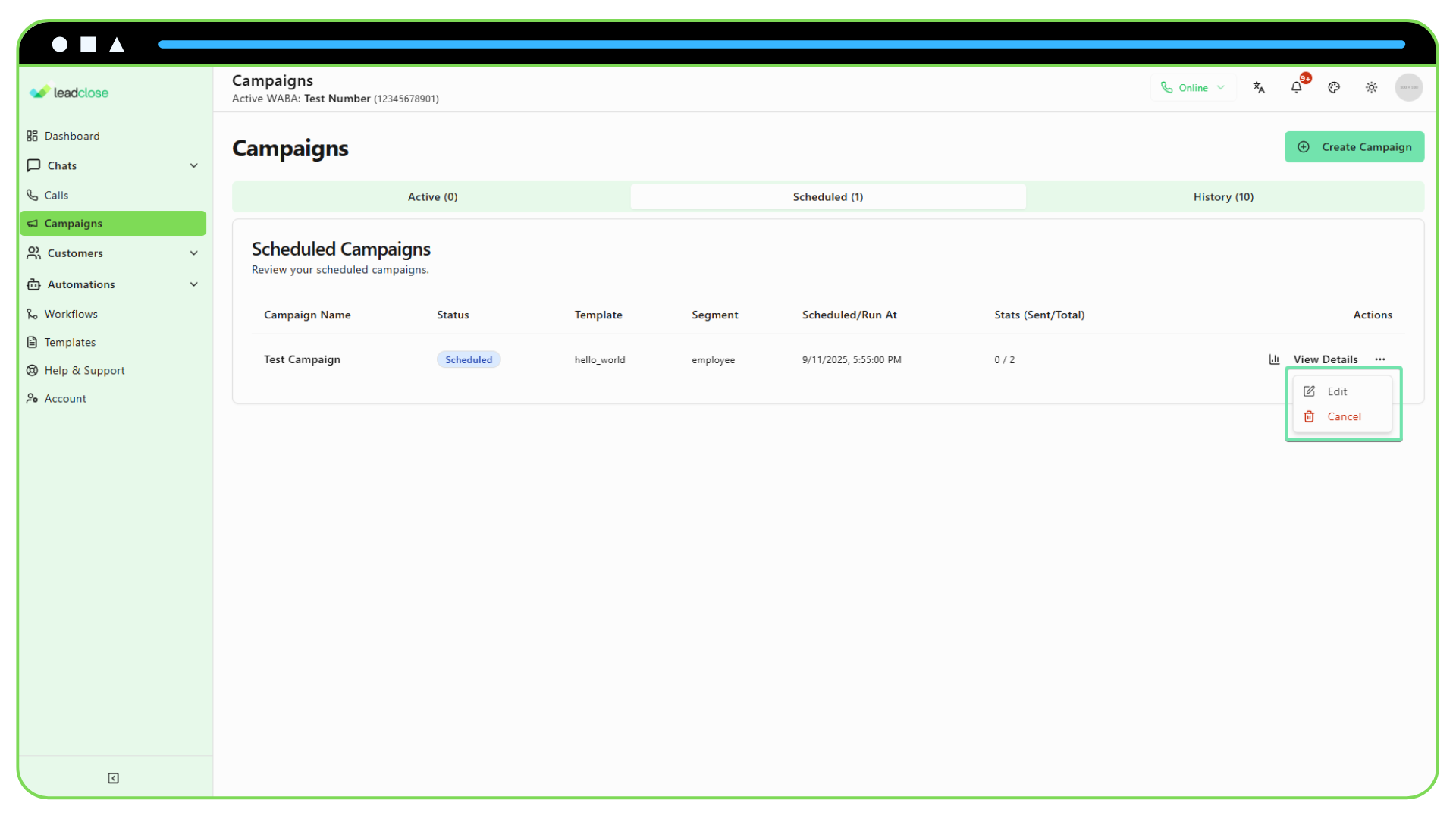
- Find the Campaign: Locate the campaign you want to cancel.
- Open the Actions Menu: Click the three-dots icon in the "Actions" column for that campaign.
- Select "Cancel": Click the "Cancel" option from the dropdown menu.
- Confirm the Action: A confirmation dialog will appear to make sure you want to proceed. Click "Yes, Cancel Campaign" to confirm.
What Happens After Cancelling?
- The campaign's status will be changed to "Cancelled".
- The campaign will be moved from the "Scheduled" tab to the "History" tab for your records.
- No messages will be sent for this campaign.